ONS Moments
For photographers and photography companies

Live photo delivery, built for photography companies.

Shoot as usual. ONS Moments sends every photo from your camera to a live gallery your client's guests open with a QR code. Offer a premium service, deliver during the event and run your whole business from one console.

  • 100 free photos to try
  • No app for guests
  • 12 languages

Available on iPhone and Android

12languages for guests
1:1free edited photo for every original
30days of gallery with every coverage
0apps for guests to install
For every occasion

One platform for every event you cover

Weddings

Guests keep their photos from the night before it even ends.

Corporate events & conferences

Speakers and attendees get their photos during the event, with a QR code on screens and badges.

Graduations

Every graduate finds their moment on stage with a single selfie.

Private parties

Birthdays, engagements and family gatherings, shared instantly with everyone who came.

How it works

From sign-up to live delivery in four steps

  1. Website

    Create your company account

    Sign up on this website in two minutes and sign the agreement online. Your console is ready right away.

  2. Website

    Add photo credits

    Buy photo packs by card in your console. Every original you deliver uses one credit.

  3. App

    Connect your camera

    Pair your Canon, Sony or Nikon with the ONS Moments app over Wi‑Fi. Every shot moves from the camera to your phone automatically.

  4. LIVE

    Guests see it live

    New photos land in the live gallery within seconds. Guests find their own with a selfie and save them in full quality.

Features

Everything a coverage needs, in one place

Live gallery

Photos appear for guests as soon as they reach your phone. No uploading after the event, no waiting.

Find me by face

Guests take a selfie and see only the photos they are in. With their consent, inside that coverage only, deletable at any time.

Edited photos, paired automatically

Upload your retouched photos and each one is matched to its original by file name. Guests get an email when they're ready.

QR code and short link

Every coverage gets its own QR code, link and cover image, ready to print or share.

Live stream and location

Add a YouTube live stream and a Google Maps location to the guest page.

Your team

Add photographers to your account and decide what each one can do.

12 languages

Guests use the gallery in their own language, from Arabic and English to Chinese, Hindi and Turkish.

Live insights

Follow visitors, photos and upload speed for every coverage from the console.

Web console

Your whole business in one console

Every company account comes with its own console. Sign in from any browser to manage coverages, photos, your team and your balance.

  • Coverages and calendar in one view
  • Upload originals and edited photos in bulk
  • Live numbers for visitors, photos and upload speed
  • Team members and what each one can do
  • Photo credits and payments

No account yet? Create one free.

The app

Run every coverage from your phone

Connect the camera over Wi‑Fi or USB, follow uploads live, share the QR code and manage your team, all in the ONS Moments app.
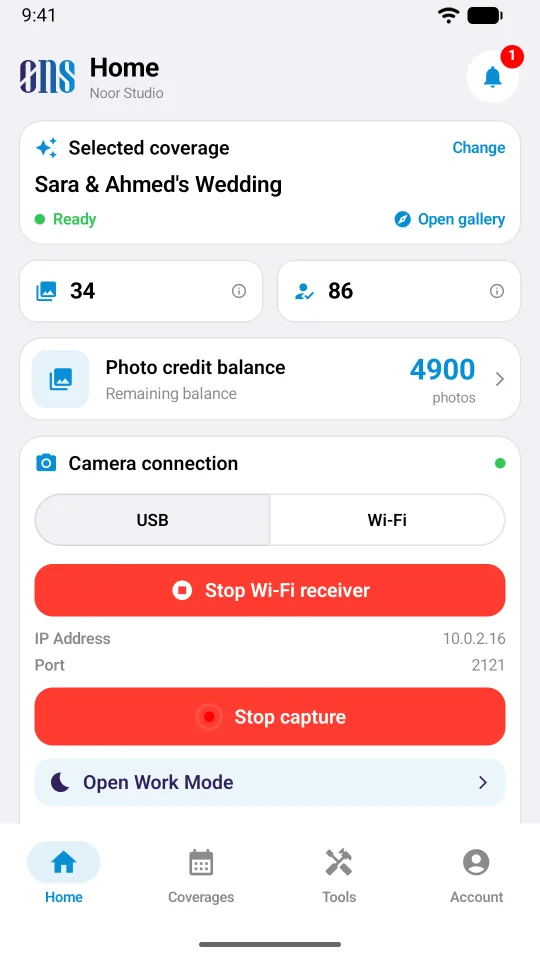
  1. Connect your camera in seconds
    1Home

    Connect your camera in seconds

    Choose Wi‑Fi or USB, start receiving, and every shot goes straight from the camera to the live gallery.
    • Wi‑Fi or USB connection, with the camera's address shown on screen
    • Your selected coverage, photo balance and live numbers at a glance
    • Start or pause receiving with one tap
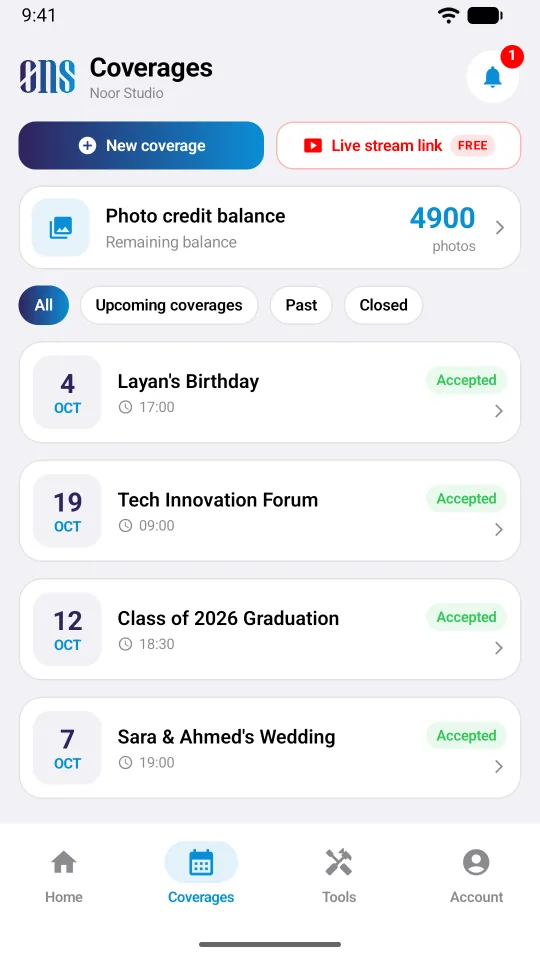
  2. All your coverages in one place
    2Coverages

    All your coverages in one place

    Create a coverage in seconds and follow the current, upcoming and past ones.
    • A new coverage or a live stream link from the same screen
    • Filter current, upcoming, past and closed coverages
    • Your photo balance always in view
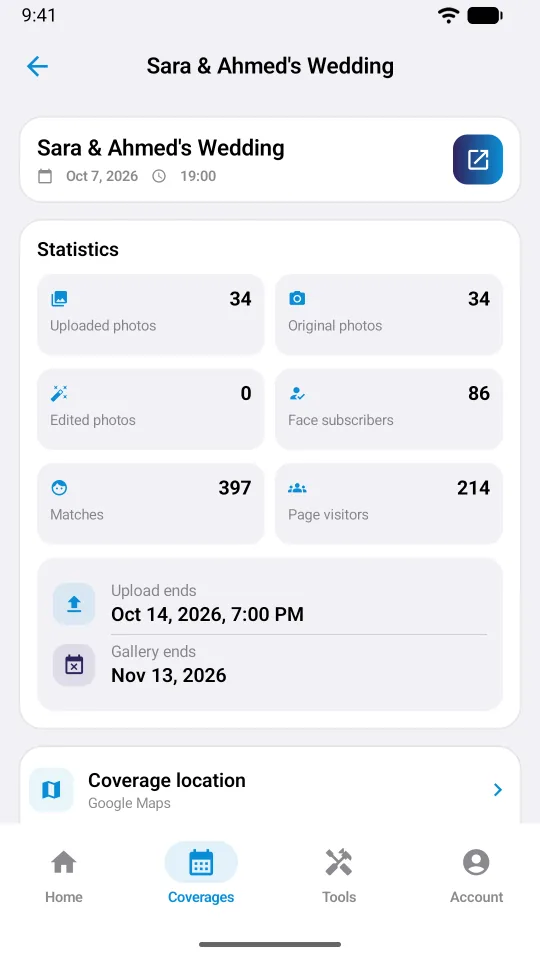
  3. Live numbers for every coverage
    3Statistics

    Live numbers for every coverage

    See how a coverage is doing while the event is still going.
    • Originals, edited photos and total uploads
    • Guests using face search, matches and gallery visitors
    • When uploading closes and when the gallery ends
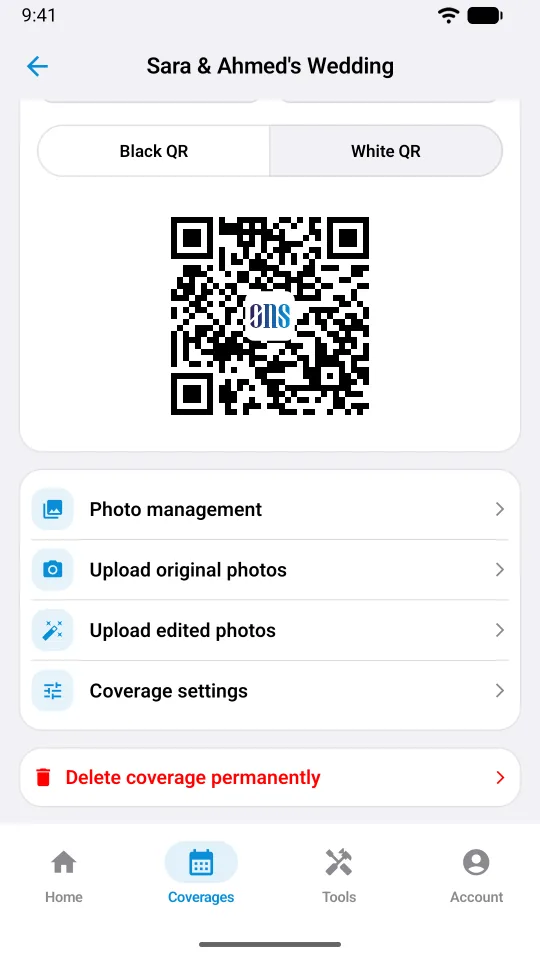
  4. Share the gallery with one QR code
    4Share

    Share the gallery with one QR code

    Show, print or save the coverage QR code, and manage everything about the coverage.
    • A black or white QR code, ready to print or save as a PNG
    • Upload originals and edited photos from the phone
    • Coverage settings and photo management
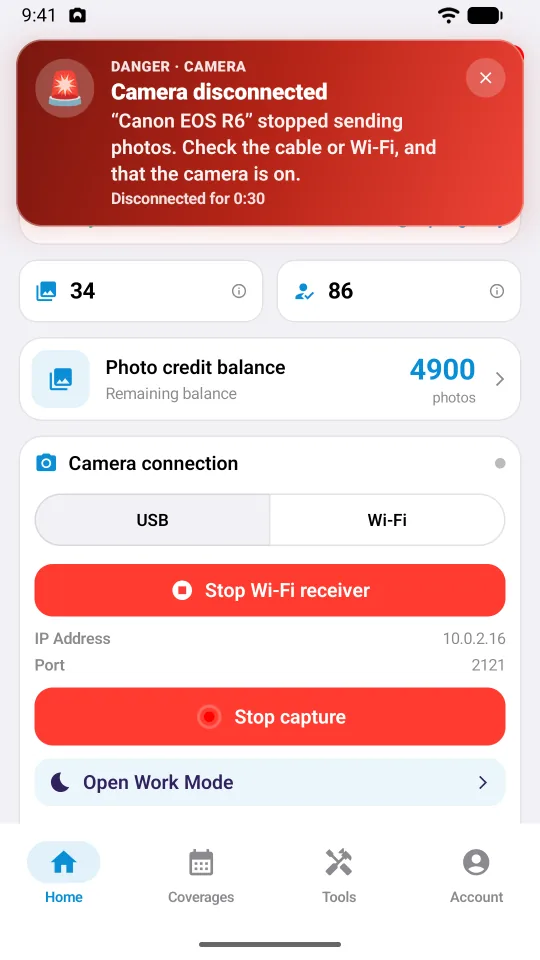
  5. Know the moment a camera disconnects
    5Camera alert

    Know the moment a camera disconnects

    If a camera stops sending photos, the app warns you right away, so no shot is lost.
    • A red alert in the app with the camera's name and the time
    • A push notification and an email to the company
    • Clear steps to reconnect over Wi‑Fi or USB
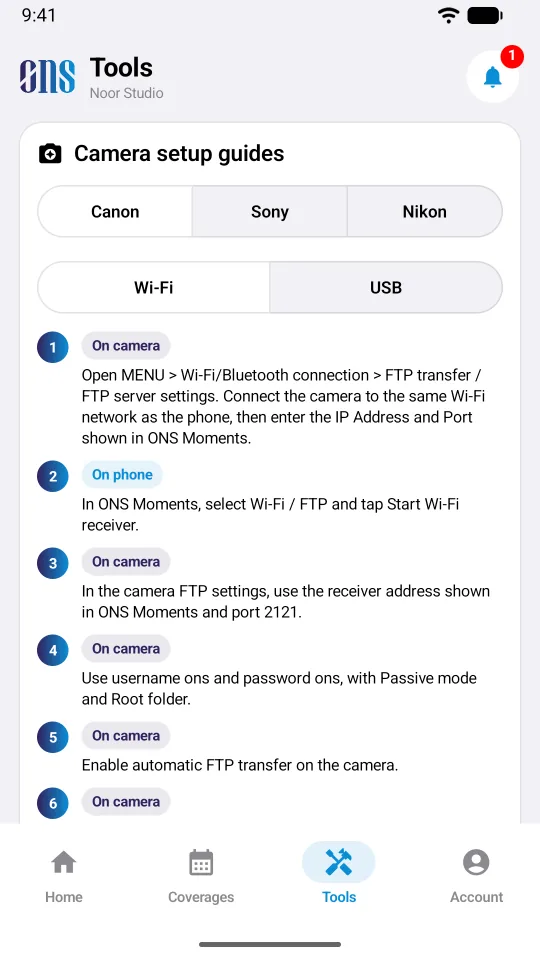
  6. Camera setup, step by step
    6Tools

    Camera setup, step by step

    Clear instructions for Canon, Sony and Nikon cameras, over Wi‑Fi or USB.

    • Guides for Canon, Sony and Nikon
    • Wi‑Fi and USB steps, one at a time
    • Need help? Our team walks you through it
Your tools

The ONS Moments app

After you create your account, download the app on the phone you shoot with. Sign in with the same email, connect your camera and deliver. Every photo uses credits from your console balance.

Scan to download the app
Why ONS Moments

A premium service for your clients. Less work for your team.

For your company

  • Deliver during the event, not days later
  • A cover image, QR code and link for every coverage
  • Pay only for the photos you deliver
  • Run everything from the app or the web console

For your clients and their guests

  • Open the gallery with a QR scan, no app needed
  • Find their own photos with one selfie
  • Save one photo or all of them at once
  • Get an email when the edited photos are ready
Pricing

Start free. Pay only for the photos you deliver.

Company account

Free

Everything you need to start.

  • 100 original + 100 edited photo credits as a welcome gift
  • The app and the web console
  • One month of gallery included with every coverage
Get started

Add-ons

Only when you need them.

  • Extra gallery month: $4.99 per coverage
  • Extra team member: $4.99 one-time
Open the console

Prices in US dollars. Pay by card in the console.

Privacy

Privacy built in, not bolted on

  • Face search runs only with the guest's consent
  • A face profile is used inside one coverage and can be deleted at any time
  • Galleries open only through the coverage link or QR code
  • Card payments go through a secure payment gateway
FAQ

Questions, answered

Where do I create my account and pay?

On this website. Create your free company account here and buy photo credits in your console. Then sign in to the app with the same email to connect your camera; the app uses the credits in your balance.

Which cameras work with ONS Moments?

Canon, Sony and Nikon cameras that can send photos over Wi‑Fi (FTP). The app shows step-by-step setup for each brand.

Do guests need to install an app?

No. Guests open the gallery in their browser by scanning the QR code or tapping the link.

How long do photos stay online?

Every coverage includes one month. You can extend any gallery month by month from the console.

How does face search protect privacy?

A guest's selfie is used only after they agree, only inside that coverage, and they can delete it from their account at any time.

How do I pay?

Buy photo packs by card in the web console. Each delivered original uses one credit, and every pack includes the same number of edited photos free.

What equipment do I need?

Your camera, a phone with the ONS Moments app and a Wi‑Fi network both of them share. The phone sends the photos to the cloud over its internet connection.

Help & setup

We'll set you up, step by step

Not sure how to connect your camera, set up the app or run your first coverage? Talk to our team directly. We help you until everything works.

  • Camera setup and connection

    We walk you through connecting your Canon, Sony or Nikon to the app over Wi‑Fi or USB.

  • Account, console and credits

    Help with your account, team members, photo credits and payments.

  • A demo for your studio

    See ONS Moments working with your own camera before your next event.

Prefer email? Write to us directlysupport@onsbh.com
Help center

Request help

Ready to offer live delivery at your next event?

Create a free company account and deliver your first coverage live.

At an event? Scan the coverage QR code on your invitation or at the venue.

Guest sign in
Language
ONS MOMENTSScan the coverage code

Point the camera at the QR code